The SABRENT DS-4SSD is a four-bay dock for people who regularly connect or rotate 2.5-inch SATA SSDs and hard drives.
This sabrent hdd docking station review looks at its high drive capacity, tool-free access, cooling fan, and the limits that matter before you buy.
SABRENT DS-4SSD Review Summary
The quick verdict
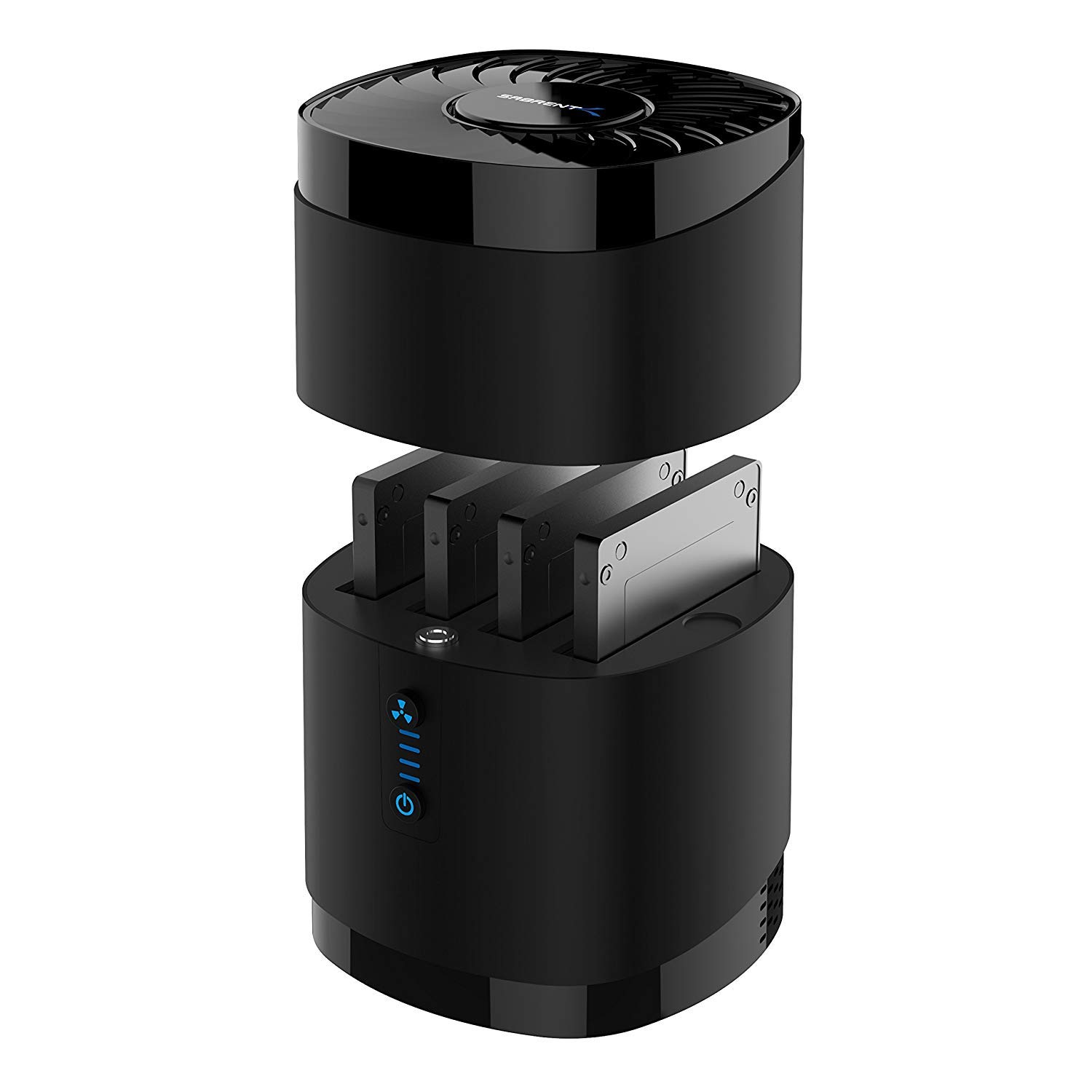
3,000+ ratings
Read Amazon ReviewsSABRENT DS-4SSD
A fit for users who swap several slim SATA drives and want a compact, tool-free desktop dock with active cooling.
- Four bays for 2.5-inch SATA SSDs or hard drives.
- Supports up to 16TB per drive, for a stated maximum of four 16TB drives.
- Drive thickness limit of 12.5mm; 15mm drives are not supported.
- USB 3.0 connection rated for transfer speeds up to 5Gbps, with USB 2.0 and 1.1 backward compatibility.

Pros
- Four bays let users keep multiple compatible drives connected through one dock.
- Tool-free access makes drive changes straightforward.
Consider before buying
- The 12.5mm thickness ceiling rules out 15mm drives, so check drive dimensions before buying.
- It is limited to 2.5-inch SATA SSDs and hard drives; users with other drive types should confirm their interface and form factor match.
Read the full review summary
The DS-4SSD’s main appeal is having four 2.5-inch SATA drives available through one desktop dock.
Each bay supports a drive up to 16TB and 12.5mm thick, so the design suits users who work with several compatible drives and want to swap them without screws or tools.
A magnetic cover is intended to make access quick.
USB 3.0 provides a connection rated for transfer speeds up to 5Gbps, with backward compatibility for USB 2.0 and 1.1.
A built-in fan is designed to help cool the installed drives, and the dock is described for continuous operation. Its fit is specific, though: it is for 2.5-inch SATA drives, does not support RAID, and excludes 15mm drives.
The buying factors
SABRENT DS-4SSD Scorecard
Editorial scores reflect listed features and buyer fit; they are not laboratory measurements or customer ratings.
Drive capacity
Four bays and support for up to 16TB per compatible drive suit multi-drive workflows.
Drive access
Tool-free swapping and a magnetic cover make the design convenient for rotating drives.
Interface flexibility
USB 3.0 supports up to 5Gbps and works with USB 2.0 and 1.1, though those older connections have their own limits.
Cooling design
The built-in fan is a useful design feature for a dock holding several drives.
Drive compatibility
It accepts 2.5-inch SATA drives up to 12.5mm thick, with clear exclusions for RAID and 15mm drives.
Operating system support
Plug-and-play operation is specified for Windows, macOS, and Linux, with no drivers needed for standard use.
Key Features and Specifications of SABRENT DS-4SSD
- Four bays for 2.5-inch SATA SSDs or hard drives.
- Supports up to 16TB per drive, for a stated maximum of four 16TB drives.
- Drive thickness limit of 12.5mm; 15mm drives are not supported.
- USB 3.0 connection rated for transfer speeds up to 5Gbps, with USB 2.0 and 1.1 backward compatibility.
- Tool-free drive swapping and a magnetic cover for access.
- Built-in fan with an optional on/off switch for noise and power control.
- Plug-and-play support for Windows, macOS, and Linux; no drivers required for standard operation.
Pros and Cons of SABRENT DS-4SSD
Pros
- Four bays let users keep multiple compatible drives connected through one dock.
- Tool-free access makes drive changes straightforward.
- High per-drive capacity supports large 2.5-inch SATA storage.
- A built-in fan and optional switch give users a way to manage cooling and fan operation.
- Broad desktop operating system support helps it fit mixed computer environments.
Consider before buying
- The 12.5mm thickness ceiling rules out 15mm drives, so check drive dimensions before buying.
- It is limited to 2.5-inch SATA SSDs and hard drives; users with other drive types should confirm their interface and form factor match.
- RAID is not supported, so the four bays should not be treated as a RAID enclosure.
- USB 3.0’s up-to-5Gbps rating is an interface maximum, not a promise that every drive or computer will transfer at that rate.
Who Should Buy SABRENT DS-4SSD?
Good fit
Consider the DS-4SSD if your routine involves moving among several 2.5-inch SATA drives, such as keeping separate drives for projects, backups, or files you access at different times.
Four bays reduce the need to repeatedly unplug one drive to connect another, while the tool-free design makes swaps less involved.
It is also worth considering when the combination of high per-drive capacity and active cooling suits a desktop storage setup.
Check that every drive is 12.5mm thick or less, and confirm that your workflow does not depend on RAID. For the best chance of reaching the interface’s rated ceiling, connect through a compatible USB 3.0 port.
The fan’s optional on/off control gives some flexibility if you want to manage fan noise while using the dock. Think about how many drives you expect to have installed and whether fan operation fits your workspace.
Who should skip it
Skip this model if you need an enclosure that builds a RAID array, or if your drives are 15mm thick. Those needs conflict with the dock’s stated design.
Look for another type of dock if your storage uses a different form factor or interface. This unit is specifically for 2.5-inch SATA SSDs and hard drives.
SABRENT DS-4SSD: What Four Bays Mean for Your Setup
Four drives in one place
The four-bay layout is most useful when several drives are part of a regular workflow. You can keep compatible drives available in the same dock rather than treating each one as a separate connection task.
Consider your actual mix of drives: the maximum capacity applies per drive, but every installed drive still needs to meet the 2.5-inch SATA and 12.5mm limits.
Understanding the USB rating
The USB 3.0 interface is rated for speeds up to 5Gbps, and the dock is backward compatible with USB 2.0 and 1.1.
Those figures describe the connection’s upper limit; they do not guarantee a particular drive’s real transfer speed.
If moving large files is central to your use, check the USB ports available on your computer and consider that an older connection may constrain transfers.
Cooling and fan control
A built-in fan is a practical feature in a multi-drive dock because the unit is designed to accommodate several drives at once.
The optional on/off switch lets you choose whether the fan runs, giving you a noise and power-control option.
The description does not specify cooling performance, so users with a particular temperature requirement should assess whether this fan-based design suits their setup.
Compatibility before purchase
The dock’s compatibility boundaries are especially important: it supports 2.5-inch SATA SSDs and hard drives, accepts drives up to 12.5mm thick, and does not support RAID or 15mm drives.
Check the drive label or manufacturer specifications for both interface and thickness. That quick check can prevent a mismatch even when a drive’s capacity appears suitable.
Alternatives to SABRENT DS-4SSD
Hard Drive Docking Stations alternative

17,000+ ratings
Read Amazon ReviewsSABRENT EC-HD2B Dual-Bay SATA Dock and Cloner
Choose the DS-4SSD if having four bays for slim 2.5-inch drives is the priority.
The EC-HD2B may suit a buyer who needs 3.5-inch drive support or offline cloning and can work within its two-bay layout and stated capacity limit.
- The EC-HD2B is a dual-bay dock for standard 2.5-inch or 3.5-inch SATA drives, supports drives up to 10TB, and offers offline cloning.
- The DS-4SSD provides four bays for 2.5-inch SATA drives, supports up to 16TB per drive, and includes a cooling fan.
Hard Drive Docking Stations alternative
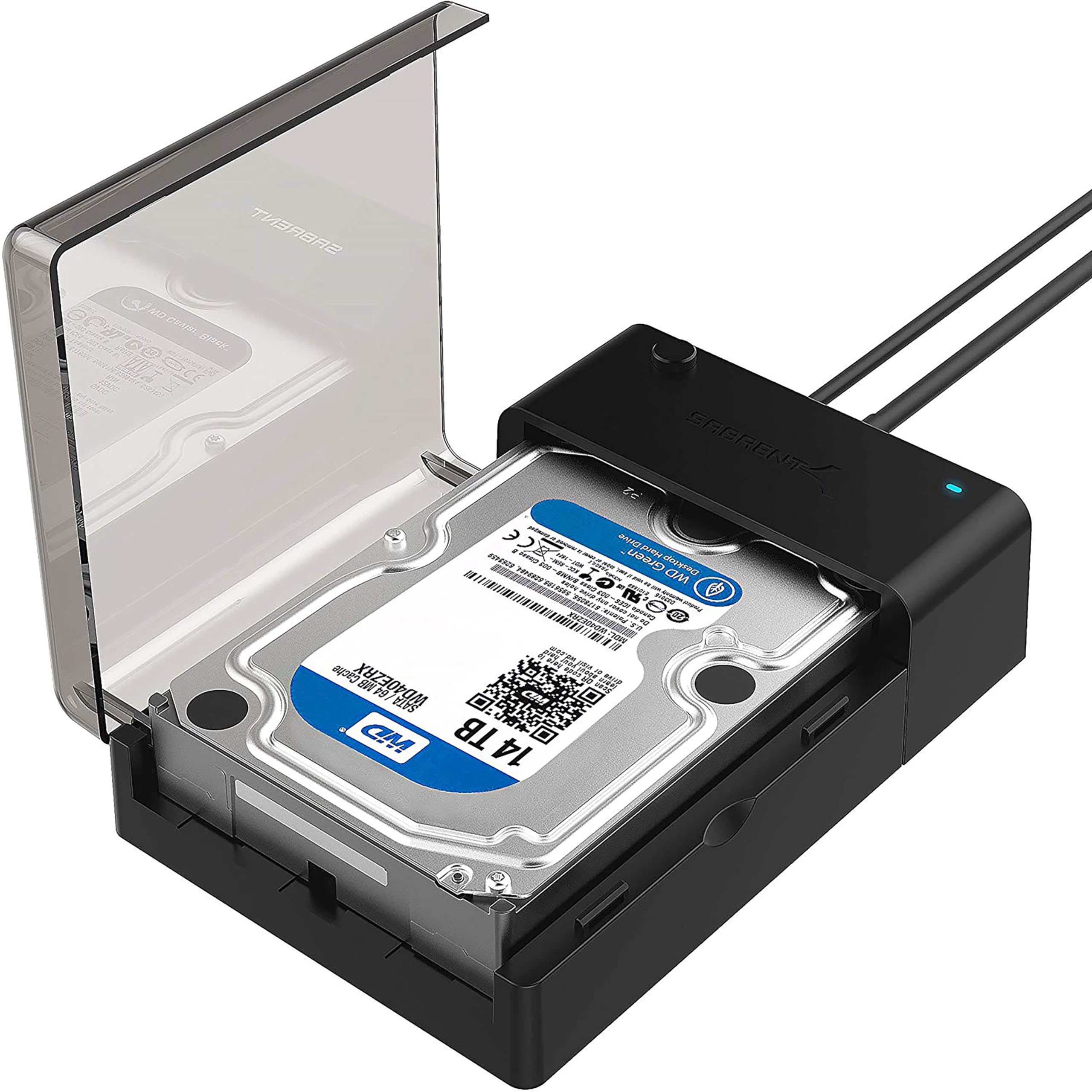
37,000+ ratings
Read Amazon ReviewsSABRENT EC-DFLT Lay-Flat SATA Dock
The DS-4SSD is the closer fit for users rotating several slim drives at once. Consider the EC-DFLT if one-at-a-time access and support for both 2.5-inch and 3.5-inch SATA drives better match your routine.
- The EC-DFLT is a single-drive, lay-flat dock for 2.5-inch or 3.5-inch SATA HDDs and SSDs.
- It supports UASP on a compatible host and uses an included USB Type-A cable; a 12V adapter is required for 3.5-inch drives.
- The DS-4SSD is built around four 2.5-inch SATA drives and includes a fan, but it does not support RAID.
Is SABRENT DS-4SSD Worth It?
The SABRENT DS-4SSD is worth considering for users who regularly access several 2.5-inch SATA drives and want four tool-free bays, a fan, and support for high-capacity drives.
Its best fit is a multi-drive desktop workflow where the drives are no thicker than 12.5mm and RAID is not required.
Before choosing it, check drive dimensions, interface, and your computer’s USB connection.
If those details line up, the DS-4SSD offers a focused way to keep multiple compatible drives accessible; if your setup needs 15mm drives, RAID, or a different form factor, choose a dock designed for that requirement.
Your review at a glance
3,000+ ratings
Read Amazon ReviewsSABRENT DS-4SSD
A fit for users who swap several slim SATA drives and want a compact, tool-free desktop dock with active cooling.
- Four bays for 2.5-inch SATA SSDs or hard drives.
- Supports up to 16TB per drive, for a stated maximum of four 16TB drives.
- Drive thickness limit of 12.5mm; 15mm drives are not supported.
- USB 3.0 connection rated for transfer speeds up to 5Gbps, with USB 2.0 and 1.1 backward compatibility.